
Blog
Comment faire une présentation commerciale convaincante ?
Dans Marketing, Matériel, Sales Enablement

Qu’est-ce qu’une présentation commerciale ?
Comme son nom l’indique, une présentation commerciale est une présentation faite par un commercial dont l’objectif est de vendre son produit ou service. Elle englobe le pitch du commercial et son support de vente qui est là pour appuyer son discours auprès de l’acheteur. Que ce soit lors d’une soutenance d’un rendez-vous physique en one to one ou à distance, la présentation commerciale réunit le commercial, l’acheteur quelle que soit sa fonction, et les autres parties impliquées par la solution proposée.
Pourquoi faire une présentation commerciale ?

Le commercial fait face à un acheteur plus exigeant et plus autonome. Celui-ci réalise 57% de son parcours d’achat avant d’initier le contact avec le fournisseur envisagé (Accenture) et sollicite le commercial à la toute fin du parcours d’achat. Lorsque ce moment survient, le commercial doit être prêt ! Il doit être capable de convaincre, d’inspirer pour espérer vendre son produit/service. La présentation commerciale est en ce sens un moyen pour éclairer l’acheteur, le rassurer, l’orienter sur les meilleures options et à le conforter dans sa décision d’achat. Pour réussir sa mission, le commercial doit connaître son interlocuteur, son métier, ses enjeux, cerner ses attentes ou besoins, les valider dans le cadre d’un échange le plus interactif possible. Il doit bien sûr maîtriser son offre/service pour répondre aux interrogations de son interlocuteur, faire valoir son expertise à travers notamment sa capacité à contextualiser ses propos en s’appuyant sur une présentation commerciale percutante.
Les différentes étapes d’une présentation commerciale réussie

1. Préparer sa présentation
80 % de la réussite d’un rendez-vous commercial vient de la qualité de sa préparation. Au-delà de connaître son offre sur le bout des doigts, préparer un rendez-vous, c’est avant tout connaître son prospect, son métier, son actualité, son marché et préparer les questions pertinentes et utiles qui vous permettront de contextualiser au mieux votre approche commerciale et la personnalisation de votre offre. En préparant votre rendez-vous, vous anticiperez également les objections des prospects et votre pitch de vente en sera d’autant plus convaincant. Cette préparation est déterminante pour aborder le rendez-vous de manière efficace et professionnelle.
2. Comprendre les besoins de l’acheteur
Une des règles d’or de la vente est l’écoute active et donc la capacité à poser les bonnes questions au fil de l’échange. En renforçant votre compréhension des enjeux de votre acheteur vous cernerez d’autant mieux ses attentes et besoins pour faire l’offre adéquat. Vous augmentez ainsi fortement votre probabilité de conclure la vente avec succès à court ou moyen terme.
3. Adapter le discours et la présentation
Pour projeter au mieux l’acheteur, le commercial doit contextualiser son approche, personnaliser sa présentation, créer une expérience de vente la plus interactive possible tout en donnant du rythme à l’échange avec un discours précis et maîtrisé.
4. Répondre aux questions : le bon argument au bon moment
Avec sa vision d’expert, le commercial doit adopter un rôle de « faiseur de sens » au milieu de toutes les informations auxquelles l’acheteur a été exposé pendant son parcours d’achat. Il doit le guider de manière naturelle pour prendre une décision éclairée. Cette étape permet de le rassurer dans son choix à venir avec des arguments précis et percutants.
5. Mettre en avant les avantages/bénéfices plutôt que les fonctionnalités
Lors de la présentation, l’acheteur doit percevoir la valeur ajoutée de la solution. Cette valeur ajoutée passe par la capacité du commercial à transmettre les bénéfices de la solution. L’acheteur doit vraiment comprendre ce qu’il a à gagner, tant pour lui que pour ses équipes.
6. Faire et remettre une proposition personnalisée
La proposition commerciale s’inscrit dans une démarche de synthèse des informations présentées lors des rendez-vous. Elle intègre des éléments liés au contexte, à la dimension fonctionnelle et technique de votre service ou produit, au planning de sa mise en œuvre ou sa date de livraison et bien sûr un volet financier. Cette proposition doit fournir une solution pertinente aux besoins de l’acheteur et déclencher son acte d’achat.
Quels sont les contenus à privilégier dans votre présentation commerciale ?

Le plus grand défi des acheteurs B2B n’est pas de trouver du contenu pertinent et utile. L’offre en la matière est abondante. En revanche, ils peinent à trier, organiser et à projeter la solution qu’ils étudient dans leur environnement pour s’assurer de prendre la meilleure décision d’achat. Les contenus marketing à privilégier dans votre présentation commerciale doivent donc être pensés dans cette optique, être contextualisés et accompagner le commercial dans une démarche de « faiseur de sens ». Ces contenus doivent vous permettre de contextualiser votre approche et discours de vente en fonction du profil de l’acheteur rencontré ou à rencontrer. Les contenus peuvent prendre différentes formes (documents, images, vidéos, simulations 3D…) et dépendent de plusieurs facteurs : le type de message à délivrer, l’entreprise et son approche commerciale, l’étape à laquelle se situe l’acheteur dans le cycle de vente, les POD (Point de différenciation ou avantage concurrentiel) à valoriser. Vous pouvez, par exemple, utiliser des contenus axés sur les missions & valeurs de l’entreprise, des contenus mettant en valeur votre offre/service et les secteurs d’activité dans lesquels vous évoluez, votre accompagnement étape par étape, vos clients et vos réalisations, votre engagement en matière de RSE… Il n’y a pas de limites dans la mesure où l’application de Sales Enablement permet d’embarquer l’ensemble des contenus marketing, disponibles offline et de les déposer dans des parcours de vente intuitifs pour le commercial. L’importance des contenus varie selon l’acheteur, il est donc inutile de créer une présentation commerciale de 100 slides (fait avec un logiciel de conception de slides) et d’assommer l’acheteur avec trop d’informations. Nous verrons dans la dernière partie de l’article que l’application de Sales Enablement est un excellent moyen pour définir quels sont les contenus à ajouter dans votre présentation commerciale.
Quels sont les outils utilisés pour faire une présentation commerciale et leurs limites ?

Il existe de nombreux outils pour faire une présentation. Le premier à avoir vu le jour est Power Point en 1984. Cette période correspondait à l’essor du Mac, des ordinateurs personnels et des premières interfaces graphiques. Son inventeur Robert Gaskins pensait que l’adoption des ordinateurs personnels entraînerait le besoin de concevoir ses propres présentations. Une intuition qui s’est avérée correcte ! Au fil du temps d’autres outils de conception de slides sont venus compléter le marché. Parmi les plus connus, on peut citer : Keynote (2003), Google Slide (2006), Canva (2012) ou encore Plezi (2015). Bien que ces outils soient adaptés pour des présentations professionnelles ou personnelles, ils ne répondent ni aux enjeux actuels des rendez-vous, ni aux attentes des acheteurs en termes d’expérience client contrairement à une application de Sales Enablement. Peut-on, en effet, s’assurer que le commercial présente le bon contenu au bon interlocuteur et au bon moment ? Est-ce que l’équipe marketing peut tracer les contenus présentés en rendez-vous et mesurer leurs performances ? Est-ce que le commercial peut contextualiser son approche avec des contenus précis et adaptés à chaque type d’acheteur ? Peut-il fournir une expérience client optimale en mode Offline ? … Vous l’aurez compris, l’application de Sales Enablement va bien au-delà de la simple logique de présentation et offre de nombreux avantages aux équipes sales & marketing qui en sont équipées. Avec Salesapps, fini les présentations commerciales où l’on s’endort, non chartées, pas à jour ou peu personnalisées pour l’acheteur. Fini la perte de temps à rechercher des contenus dans un Drive ou à construire des présentations sans fin ou avec des messages inadaptés. Fini le gaspillage d’argent dans des contenus marketing non utilisés par le commercial… Avec Salesapps tout est fait sur mesure pour garantir au commercial une expérience de vente optimale lors de ses rendez-vous.
Le Sales Enablement pour réussir votre présentation commerciale

L’application de Sales Enablement est un outil puissant qui permet d’accompagner le commercial dans son quotidien. Elle améliore sa performance à chaque étape de la vente, le rendant ainsi mieux armé pour créer une nouvelle expérience de vente avec l’acheteur, valoriser son offre et vendre plus.
1. Accélérer la préparation de votre présentation commerciale
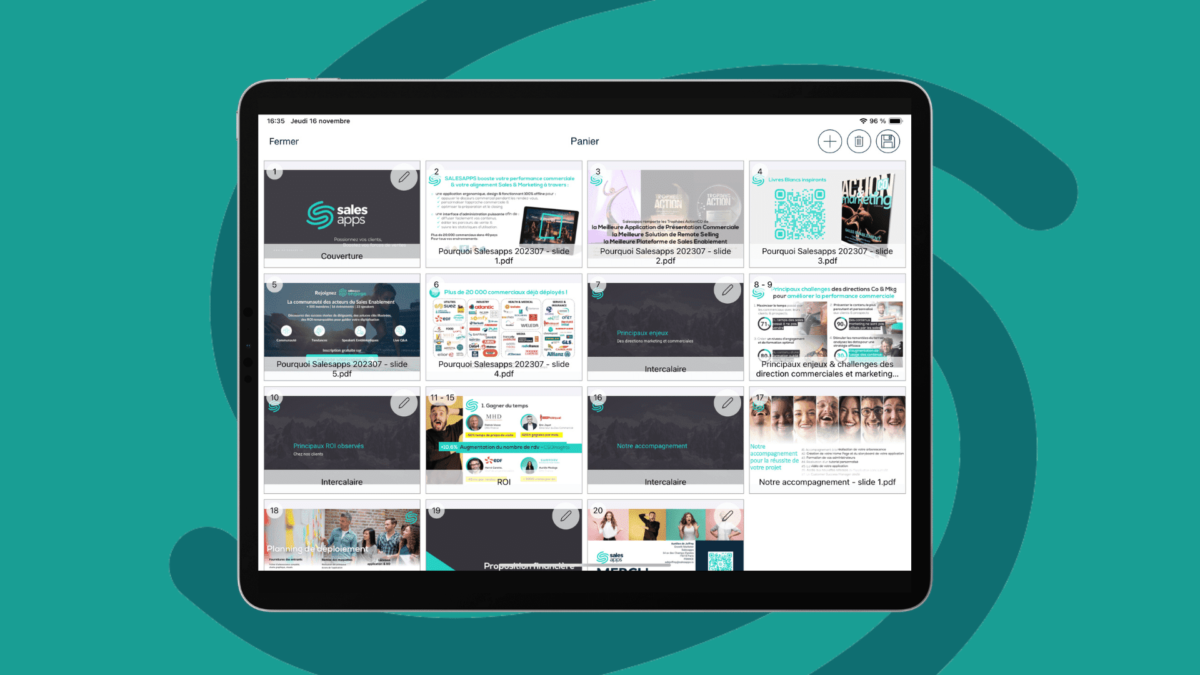
Le commercial passe seulement un tiers de son temps à son cœur de métier, à savoir la vente. C’est ce que souligne une étude Jeff Ernst : 65% du temps du commercial n’est pas dédié à la vente (réunions, recherche de contenus, saisie dans le CRM..). Cette tendance s’est d’ailleurs confirmée avec l’étude de Value Selling Associates qui indique que 36% du temps des commerciaux est dédié à la préparation des rendez-vous clients (bâtir des propositions et rechercher du contenu). L’objectif est de libérer du temps au commercial en éliminant les tâches chronophages ou administratives afin qu’il puisse consacrer davantage de temps à la vente. L’application de Sales Enablement agit dans ce sens ! En centralisant l’ensemble des contenus marketing, le commercial peut accéder facilement et rapidement aux contenus marketing nécessaires pour préparer sa présentation commerciale. Le Résultat ? Un gain de temps estimé à 45min sur la préparation d’un rendez-vous selon Hervé Carette, Chef de projet Innovation chez EDF.
2. Mesurer la performance des contenus présentés en rendez-vous
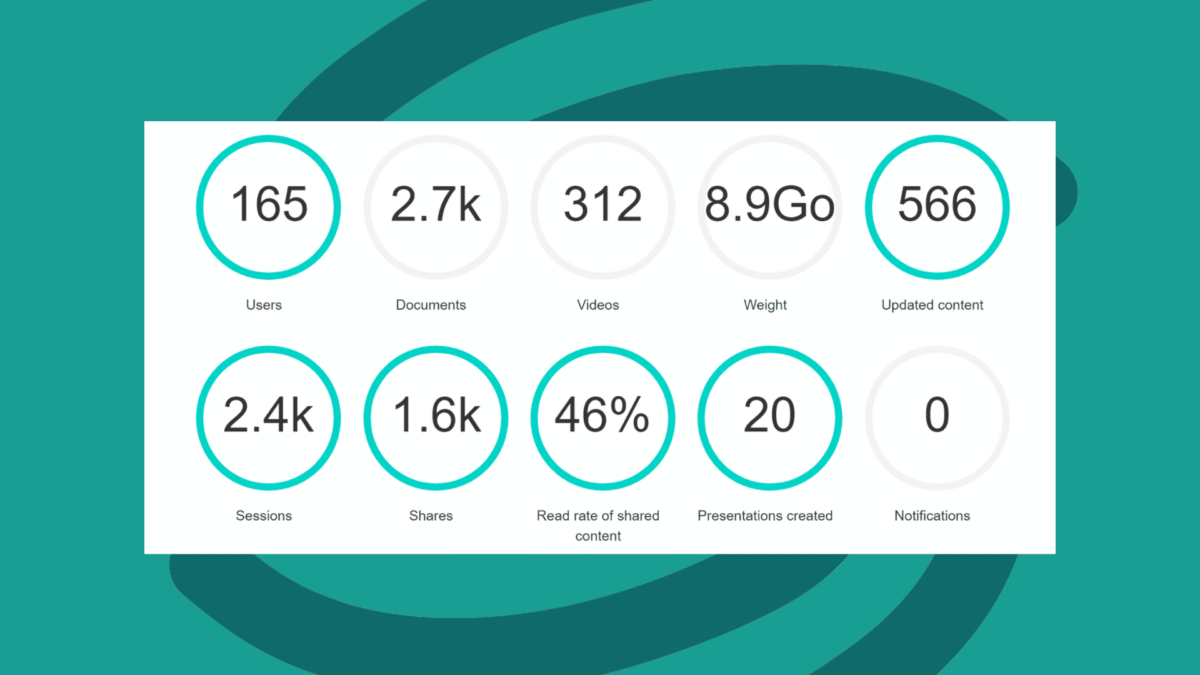
L’autre atout de l’application de Sales Enablement réside dans sa capacité à fournir aux équipes marketing des statistiques d’utilisation des contenus utilisés lors de la présentation commerciale. C’est un élément crucial, surtout compte tenu du fait que 91% des entreprises B2B investissent dans la création de contenus marketing, mais seulement 35% d’entre elles en mesurent le ROI (Smart Insight). Une mauvaise habitude accentuée par le manque de fonctionnalités offertes par la grande majorité des outils de présentations du marché, qui ne sont pas conçus pour les rendez-vous commerciaux. En revanche, l’application de Sales Enablement offre aux équipes marketing une réelle visibilité sur ce qui est présenté lors d’un rendez-vous commercial en présentiel comme en distanciel. L’administrateur de l’application peut ainsi suivre des KPIS comme le suivi du parcours de vente utilisé en rendez-vous, le taux de lecture des contenus partagés, le nombre de présentations créées par commerciaux, le top 10 des contenus (documents, images, vidéos) les plus consultés en rendez-vous… L’équipe marketing se positionne ainsi dans une démarche d’amélioration continue en dupliquant l’approche commerciale des meilleurs à l’ensemble de la force de vente et en disposant des clés pour arbitrer ses investissements en termes de création de contenus.
3. Améliorer l’efficacité de vos relances commerciales
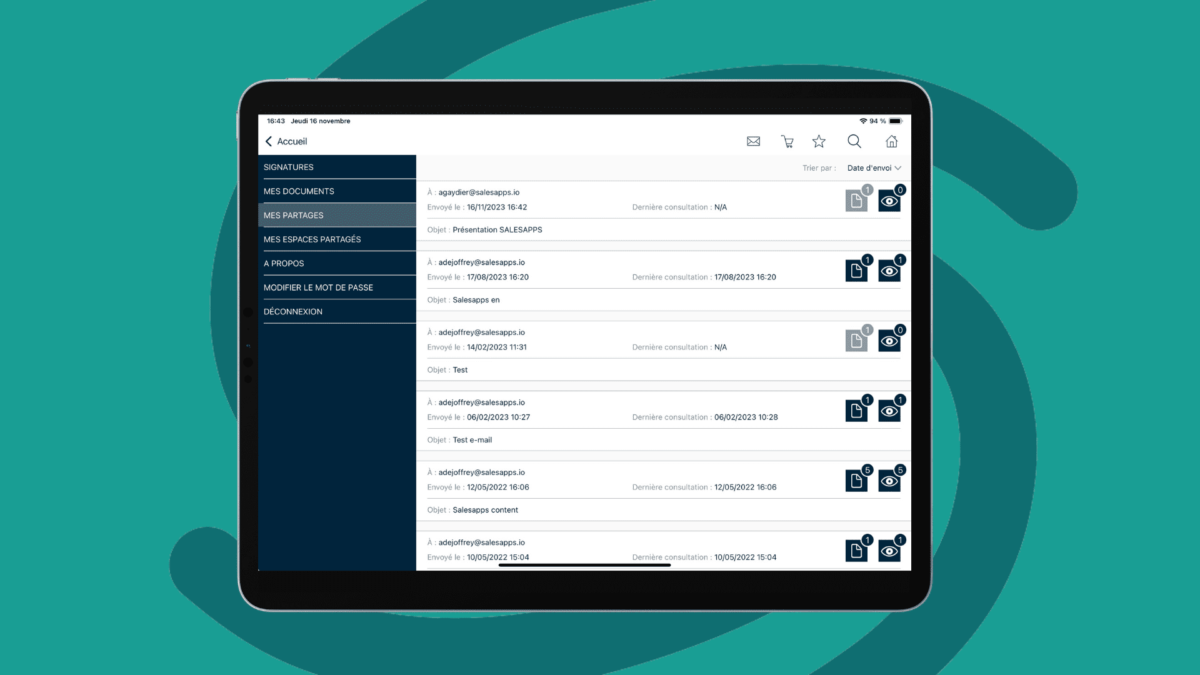
La présentation commerciale est terminée. Dans un monde idéal, vous repartez avec un bon de commande signé mais la plupart du temps va se poser la question du suivi et de savoir « Quel est le meilleur moment pour relancer l’acheteur ? ». Trop tôt, la relance serait inutile, trop souvent, l’acheteur aurait l’impression que vous êtes trop insistant, trop tard, il aura peut-être déjà avancé avec votre concurrent ! Le bon timing de vos relances est donc une clé de votre réussite. Pour éviter ce genre de situation, l’application de Sales Enablement permet de tracer l’ensemble des contenus partagés avec l’acheteur : quels contenus l’acheteur a-t-il consulté ou non ? combien de fois ? Les ‘a-t-il partagé avec d’autres personnes ? Combien de jours après la présentation commerciale cela s’est-il produit ? Ces informations permettent au commercial d’avoir des informations précises sur le meilleur moment d’organiser ses relances et surtout sur le type message sur lequel il va pouvoir s’appuyer. Le commercial pourra ainsi augmenter son taux de transformation et vendre plus.
Découvrez aussi notre article sur le Sales Enablement et la présentation commerciale à distance.
FAQ
Qu’est-ce qu’une présentation commerciale ?
Une présentation commerciale est une présentation avec un support de vente dans lequel le commercial pitch son produit ou service auprès d’un acheteur dans le but de lui vendre la solution idéale.
Comment réussir une présentation commerciale ?
La préparation est un élément clé de la réussite d’une présentation commerciale. D’autres éléments importants comme le support de vente utilisé, l’argumentaire de vente, l’expérience véhiculée en rendez-vous et la capacité à personnaliser votre approche sont essentiels à la réussite de votre rendez-vous commercial. Transformez maintenant vos prospects en clients grâce au Sales Enablement.
Comment faire une bonne présentation commerciale ?
Ne vous contentez pas de faire une bonne présentation, visez plutôt à atteindre votre objectif le jour J. La préparation est déterminante, les questions posées le sont encore plus pour comprendre les besoins de l’acheteur. Soyez dans une démarche d’aide et d’accompagnement pour l’aider à prendre la bonne décision. La personnalisation du discours et l’utilisation de contenus marketing impactant (éléments visuels…) joue aussi un rôle essentiel dans la réussite de votre présentation.
Quels outils pour réussir sa présentation commerciale ?
De nombreux outils (PowerPoint, Keynote, Google Slide, Canva, Plezi) s’inscrivent dans une logique de présentation mais ne sont en aucun cas des outils adaptés pour le rendez-vous commercial. L’application de Sales Enablement Salesapps fait partie des meilleurs outils à ce jour pour répondre à cet enjeu et permet au commercial de faire une présentation efficace en rendez-vous. À titre d’exemple, vous pouvez utiliser PowerPoint comme outil essentiel à la création de vos contenus marketing, puis déposer ces contenus dans des parcours de vente intuitifs grâce à l’application de Sales Enablement.
Quels contenus intégrer en fin de présentation commerciale ?
Évitez les contenus dont la seule finalité est de remercier. Utilisez plutôt ce contenu pour synthétiser les éléments clés abordés lors de la présentation commerciale. Optez pour du contenu personnalisé ou téléchargeable, complémentaire à ce qui a été abordé, afin d’approfondir la compréhension du sujet par l’acheteur B2B.